Build Vedic D1 and D9 charts with Node.js
Render the same synthetic birth details as a D1 Rashi chart and a D9 Navamsha chart. Keep Lahiri ayanamsa explicit and choose a North or South Indian layout.
Available on Free: 500 standard requests per UTC calendar month. No credit card required. This example makes 2 calculation requests per run.
One birth, two divisions
North Indian layout
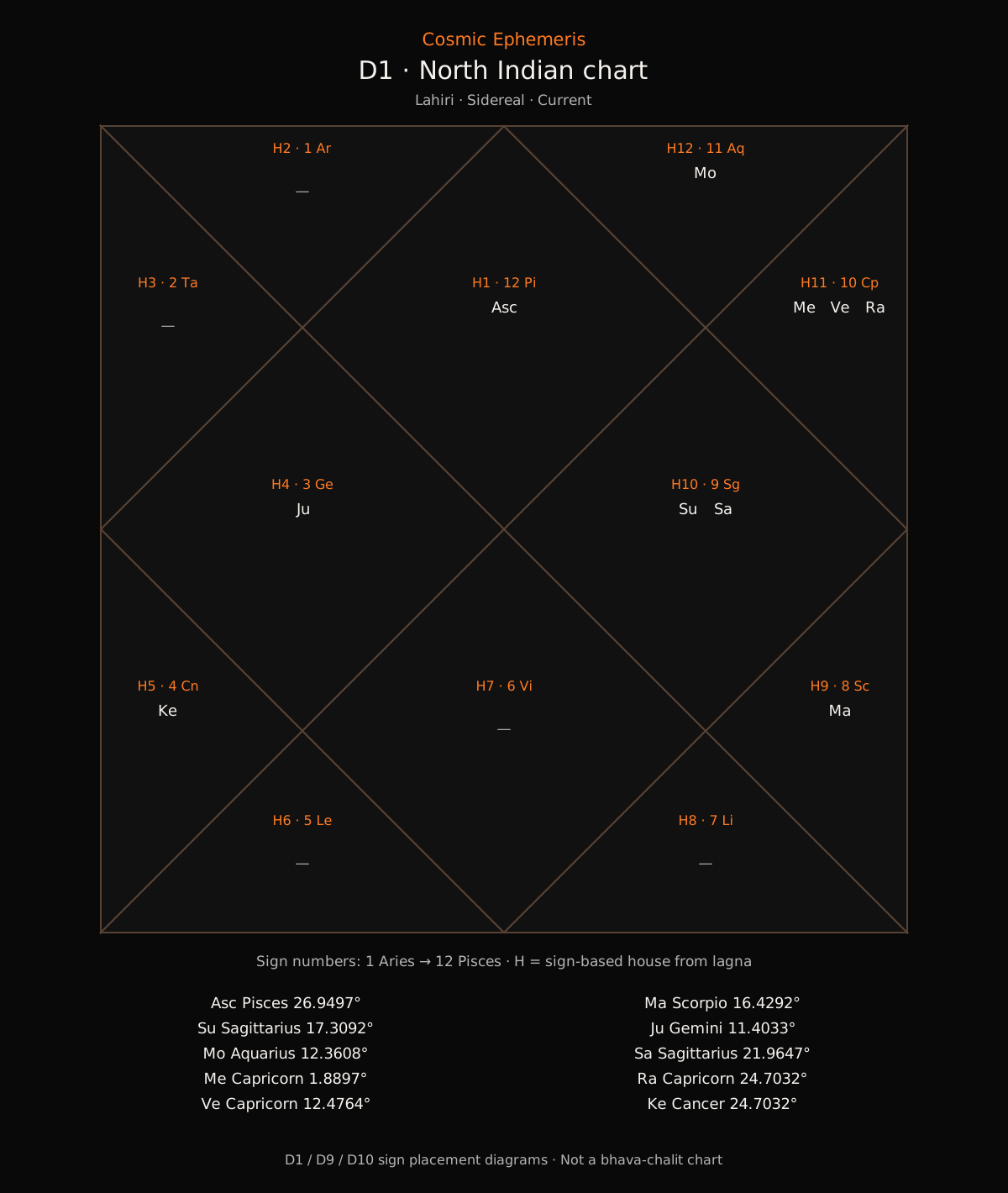
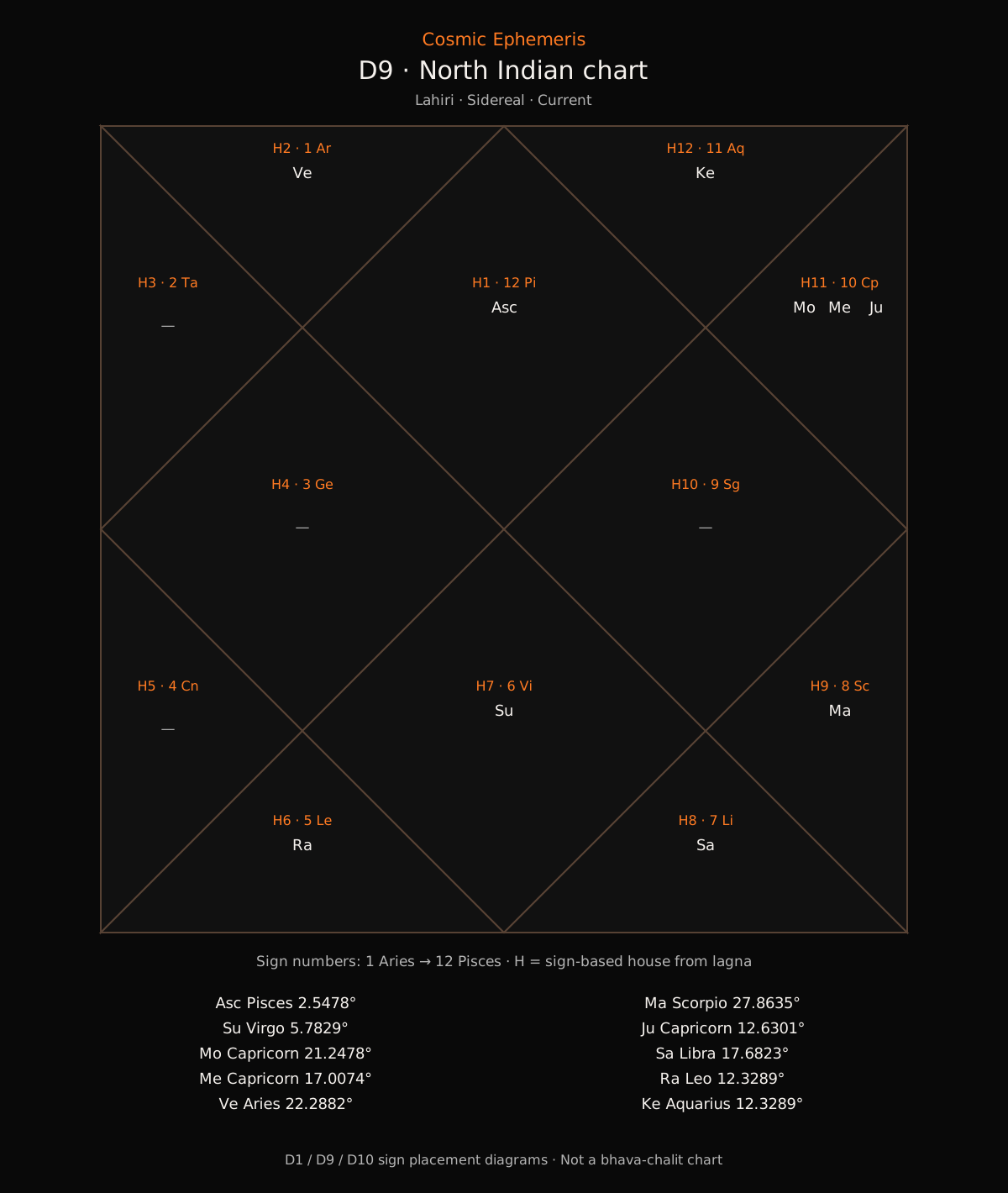
South Indian layout
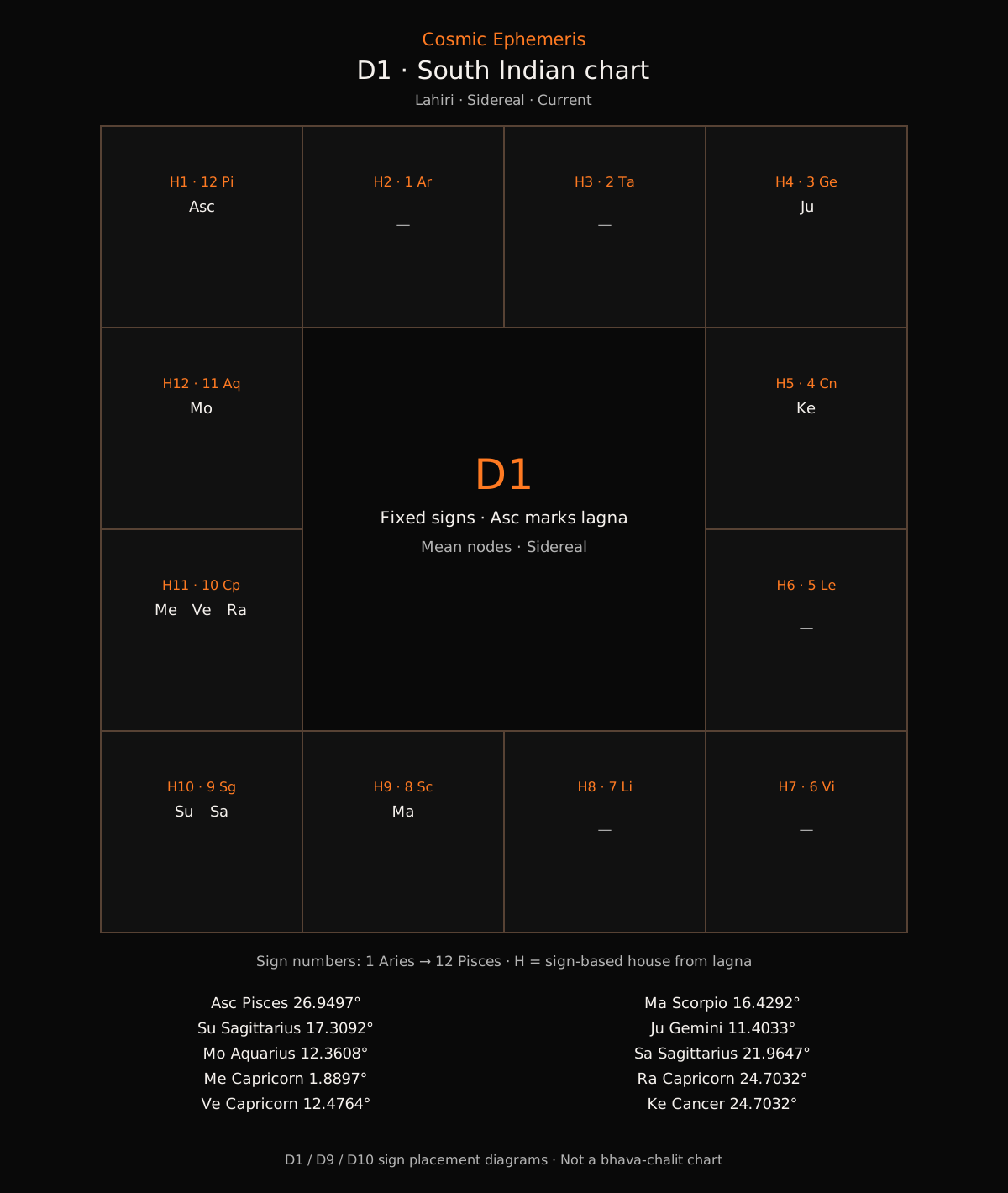
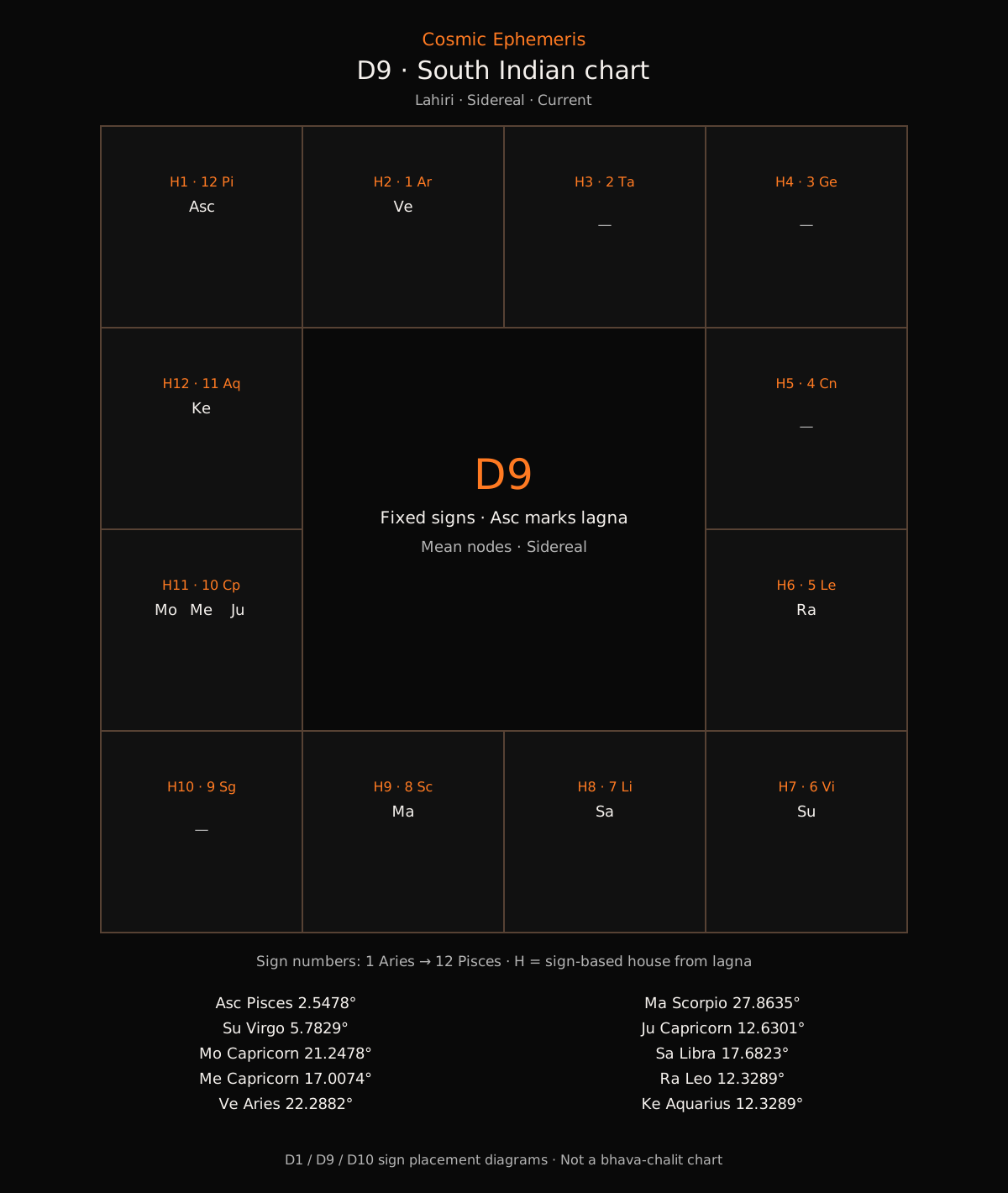
The switch displays pre-generated examples. It makes no API calls.
1. Set up your project
You need Node.js 22+ and a verified Cosmic Ephemeris account. Create a free account and verify your email if you have not already.
- Open API Keys and enter a Key label, such as
Developer tutorial. - Under Access scopes, select
astro:varga-svg, then click Create API key. Selecting a specific scope replaces the default “All calculation endpoints”. - Click Copy key and save the complete key privately. It is shown only once; the shortened prefix in the key list will not work.
mkdir vedic-charts-demo
cd vedic-charts-demo
npm init -y
npm install cosmicephemeris@0.5.0
Already have a key? Reuse it if it includes this tutorial’s scope. One key can serve several projects: select all their required scopes when creating it. You do not need a separate key for each tutorial.
Save your key in a private .env file
Inside the project folder you just created, use your text editor to create a file named .env (not .env.txt). Put this single line in it:
COSMICEPHEMERIS_KEY=PASTE_YOUR_FULL_API_KEY_HEREReplace PASTE_YOUR_FULL_API_KEY_HERE with the full key you copied. This is a placeholder, not a working key. Keep .env in the same folder where you will run vedic-charts.mjs; the command later uses --env-file=.env to load it.
Create or open .gitignore in that folder and add this line so Git will ignore the key file:
.envKeep the key on your server or local development computer. Do not put it in browser JavaScript, URLs, screenshots or a public repository. Signing in to this website does not authenticate your Node.js script; it still needs the key. See the authentication guide.
2. Save the complete script
Save this as vedic-charts.mjs, or download the script. It calls POST https://api.cosmicephemeris.com/api/astro/varga-svg.
// Node.js 22+; server-side only. Install: npm install cosmicephemeris@0.5.0
// Set COSMICEPHEMERIS_KEY privately. No automatic retries.
import { mkdir, writeFile } from "node:fs/promises";
import { CosmicEphemeris, CosmicEphemerisError } from "cosmicephemeris";

// Optional first argument: north_indian (default) or south_indian.
const layout = process.argv[2] ?? "north_indian";
const output = "vedic-charts-output";
try {
  if (!["north_indian", "south_indian"].includes(layout)) {
    console.error("Choose north_indian or south_indian.");
    process.exit(1);
  }
  const api = new CosmicEphemeris();
  await mkdir(output, { mode: 0o700 });
  const birth = {
    date: "1990-01-01", time: "12:00", timezone: "America/New_York",
    lat: 40.7128, lon: -74.006,
  };
  // Two metered requests, one at a time. Stop if either request fails.
  for (const division of [1, 9]) {
    const chart = await api.vargaSvg({
      birth, division, ayanamsa: "lahiri", layout, theme: "dark",
    });
    await writeFile(`${output}/d${division}.svg`, chart.svg, {
      encoding: "utf8", flag: "wx", mode: 0o600,
    });
    console.log(`Created vedic-charts-output/d${division}.svg (${layout}).`);
  }
} catch (error) {
  if (error instanceof CosmicEphemerisError) {
    console.error("API request failed:", error.code, error.status ?? "");
  } else if (error?.code === "EEXIST") {
    console.error("Output folder already exists. Rename it before another run.");
  } else {
    console.error("Could not finish. Check the input and folder permissions.");
  }
  process.exitCode = 1;
}
3. Run it once
node --env-file=.env vedic-charts.mjs north_indianIf your server already sets the environment variable, omit --env-file=.env. Results are saved in the private vedic-charts-output folder. Rename an existing folder before another run; the script checks that before making a request. A failed run may leave an empty or partially completed folder.
Each admitted calculation uses one standard unit, including failed calculations. This example makes two calls, so a successful run uses two units. A timeout may still consume quota. The script makes no automatic retries. Viewing these sample results and downloading files makes no calculation request.
Choose North or South Indian layouts
The script makes two requests sequentially: D1, then D9. Its output folder contains d1.svg and d9.svg. Both use the same synthetic birth details and ayanamsa: "lahiri".
To generate South Indian layouts, rename the previous output folder and run:
node --env-file=.env vedic-charts.mjs south_indianChanging layout changes presentation; D1 and D9 remain different calculations. If the second request fails, keep the successful first file and inspect the failure before deciding what to rerun.
Keep the conventions explicit
D1 is the Rashi chart. D9 is the Navamsha division. This endpoint is sidereal, so specify an ayanamsa and do not send a zodiac field. The renderer includes the divisional Ascendant and nine traditional bodies, including mean Rahu and Ketu. Houses count signs from the divisional Ascendant; this is not a bhava-chalit chart or a reading.
Keep the returned SVG on your server and display it as an image. See the Vargas reference before selecting other divisions or conventions.
Inputs and troubleshooting
If Node says it cannot find .env: run the command from the project folder and check that the filename is exactly .env. If the key is missing or invalid, replace the placeholder with your complete key. If you receive HTTP 403, check the key’s required scope above.
Modern civil dates cover 1800-01-01 through 2200-12-31, subject to route and derived-time limits. Use explicit timezones. Historical inputs require the separate historical date contract; do not substitute BCE years into these date strings. The birth details shown here are synthetic; keep real customer data private.
A missing or malformed key fails before the request. For HTTP 401/403, check your key, account and scope. For 400, check the documented input. For 429, check allowance, key budget and rate or concurrency limits. For a timeout or server error, check service status before deciding whether to rerun.
All developer projects · SDK quickstart · Postman collection